Automate PDF Generation
with Zapier

Connect TemplateFox to 7,000+ apps with our native Zapier integration. No code required — just point, click, and automate your PDF workflows.


Typeform
TemplateFox
Gmail

PDF generation should not be that hard

Design once. Let Zapier generate the rest.

1

Design your template

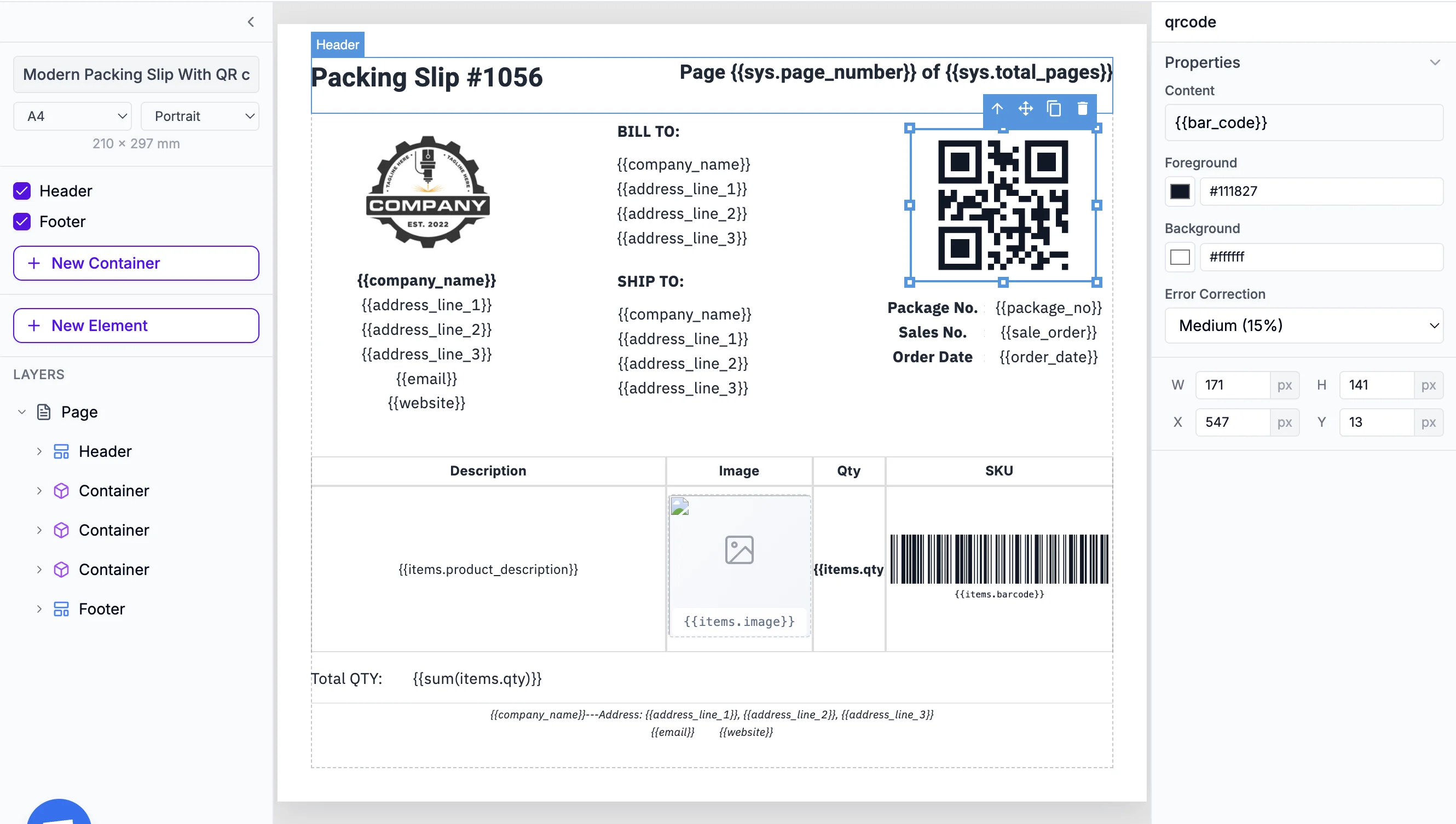
Use our drag-and-drop editor and add dynamic fields like {{name}} or {{invoice_total}}.

2

Use it in Zapier

Add TemplateFox as an action in your Zap. Map fields from your trigger to your template variables.

3

Receive your PDF

Get your PDF instantly via sync response, webhook, or directly uploaded to your S3 bucket.
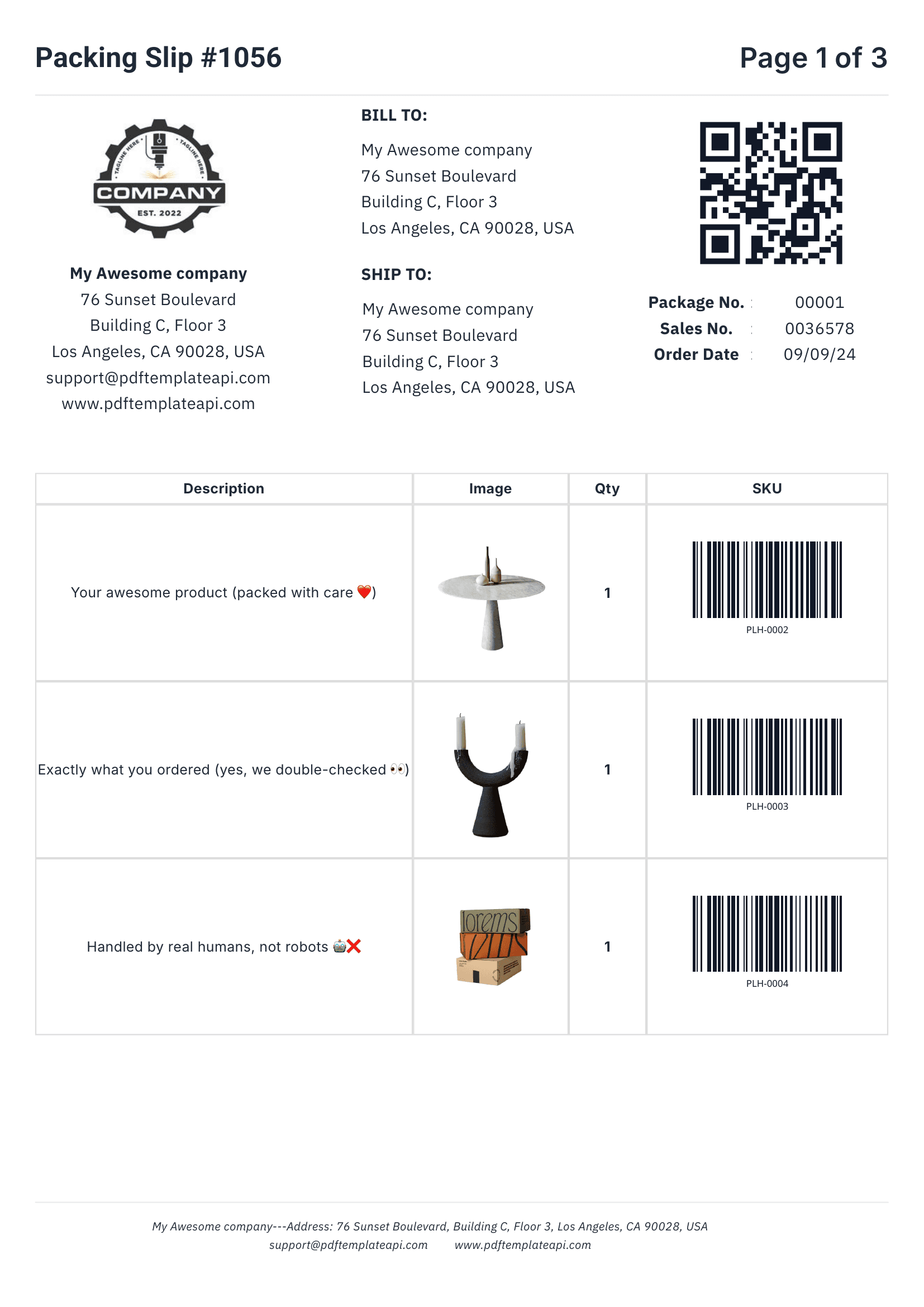
Looks great
PDF template example - Packing Slip
1
2
3
4

Built for real-world documents

Everything you need to create professional business documents, from invoices to packing slips.

1

Headers & footers that just work

Define once, repeat on every page automatically. Perfect for logos, page numbers, and legal mentions.

2

Dynamic data binding

Inject any data into your templates. Names, addresses, prices, etc. — everything updates automatically.

3

Tables that grow with your data

Rows grow automatically with your data. 3 items or 300, the table adapts and spans multiple pages if needed.

4

Built-in QR codes & barcodes

Generated on the fly from your data. Supports Code128, EAN-13, QR codes and more — all scanner-ready.

Try it free

60 free PDFs/month

Easy to use

Documents that adapt to your data

Go beyond simple placeholders. Use expressions to format, calculate, and control your content.

1

Use system variables

Access page numbers, total pages, and current date and more automatically with {{sys.page_number}} and friends.

2

Customize every component

Fine-tune content, borders, colors, sizes, positions, and more. Each element has its own properties panel.

3

Built-in functions

Format dates, calculate totals, round numbers, and more. Use 100+ built-in functions or create your own.

Start building

No credit card required

Template editor with expressions
1
2
3
Step-by-step guides

Use cases

See what you can automate with Zapier and TemplateFox.

Cloud storage

Built-in S3 Integration

Save your generated PDFs directly to Amazon S3 or any S3-compatible storage (Cloudflare R2, MinIO, DigitalOcean Spaces). No extra Zapier steps needed.

Learn how to bring your own storage

Is Zapier right for you?

Zapier is the easiest way to automate PDFs. Here's how to decide.

Recommended
Zapier

Use Zapier if you need:

  • Native integration — no HTTP setup
  • Simple 1:1 trigger-to-PDF workflows
  • Easiest setup for non-technical users
  • 7,000+ app connections out of the box

Or consider:

Make
Make
  • Iteration for bulk PDF generation
  • More cost-effective at scale
n8n
n8n
  • Self-hosted for compliance
  • Most technical, full control

Frequently asked questions

How does the TemplateFox and Zapier integration work?

TemplateFox has a native Zapier integration. Once you connect your account, you can add TemplateFox as an action in any Zap. When your trigger fires (form submission, new order, etc.), Zapier automatically calls TemplateFox to generate a PDF based on your template.

Do I need any coding experience to set up this integration?

No coding required at all. Zapier provides a simple point-and-click interface. Just select your trigger app, add TemplateFox as an action, map your fields, and you're done. The entire setup takes about 5 minutes.

How do I connect TemplateFox to Zapier?

First, accept the Zapier invite to add TemplateFox to your account. Then create a new Zap, search for "TemplateFox" as your action, and authenticate with your API key from your Dashboard.

Can I generate images as well as PDFs with Zapier?

Yes! TemplateFox supports both PDF and PNG output formats. In your Zap configuration, simply select the output format you need — perfect for generating social media graphics, product labels, or document thumbnails.

What triggers can I use to start PDF generation?

Any Zapier trigger works: new Google Sheets row, Typeform submission, Shopify order, HubSpot deal update, Slack message, webhook, scheduled time, and 7,000+ more. If it's in Zapier, it can trigger your PDF generation.

Can I send the generated PDF somewhere automatically?

Absolutely. After TemplateFox generates your PDF, you can add more actions to your Zap: email it via Gmail, save to Google Drive or Dropbox, attach to a Slack message, update a CRM record, or any other Zapier action.

What are common use cases for TemplateFox with Zapier?

Popular use cases include: Invoice Generation (create invoices when orders come in), Contract Automation (generate contracts when deals close), Certificate Creation (produce certificates on course completion), Receipt Emails (send PDF receipts after purchases), and Report Distribution (generate and email weekly reports).

How fast is PDF generation with TemplateFox?

Most PDFs generate in under 2 seconds. Your Zap continues immediately with the PDF URL, so you can chain additional actions without delays. Complex multi-page documents may take slightly longer.

Are there any limits or additional costs?

Your costs include your Zapier plan and TemplateFox subscription. TemplateFox offers 60 free PDFs/month, then paid plans based on volume. Zapier charges based on tasks — each PDF generation counts as one task. Check our pricing for details.

Automate your PDF generation

Complete documentation, no-code integrations, and a powerful API to help you generate PDFs at scale. Let us handle the boring stuff.