Design templates
without writing code

Drag-and-drop editor for pixel-perfect certificates, dynamic invoices, and everything in between. Add tables, QR codes, barcodes, and expressions visually.

3 free templates. No credit card required.

Two layout modes

Fixed designs. Dynamic documents. One editor.

Most PDF tools only handle one or the other. TemplateFox does both.

Fixed layout

Pixel-perfect, single-page documents where every element stays exactly where you place it.

  • Certificates & diplomas
  • ID cards & badges
  • Shipping labels
  • Business cards
  • Social media graphics

Dynamic layout

Tables grow with your data, content flows across pages, headers and footers repeat automatically.

  • Invoices with variable line items
  • Multi-page reports & contracts
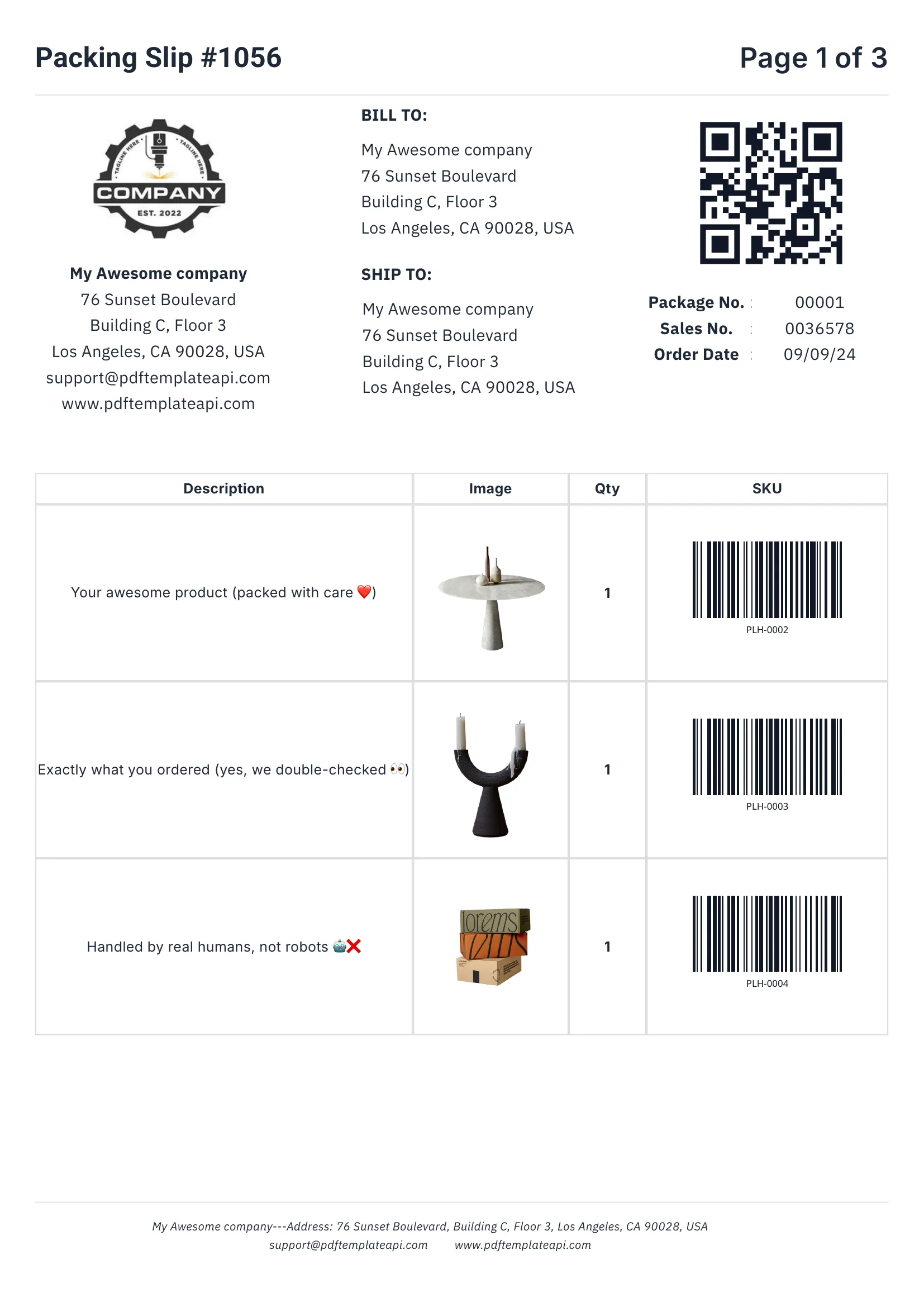
  • Packing slips & order summaries
  • Data-driven tables (3 rows or 300)
  • Auto-pagination with headers/footers
Looks great
PDF template example - Packing Slip
1
2
3
4

Built for real-world documents

Everything you need to create professional business documents, from invoices to packing slips.

1

Headers & footers that just work

Define once, repeat on every page automatically. Perfect for logos, page numbers, and legal mentions.

2

Dynamic data binding

Inject any data into your templates. Names, addresses, prices, etc. — everything updates automatically.

3

Tables that grow with your data

Rows grow automatically with your data. 3 items or 300, the table adapts and spans multiple pages if needed.

4

Built-in QR codes & barcodes

Generated on the fly from your data. Supports Code128, EAN-13, QR codes and more — all scanner-ready.

Try it free

60 free PDFs/month
Easy to use

Documents that adapt to your data

Go beyond simple placeholders. Use expressions to format, calculate, and control your content.

1

Use system variables

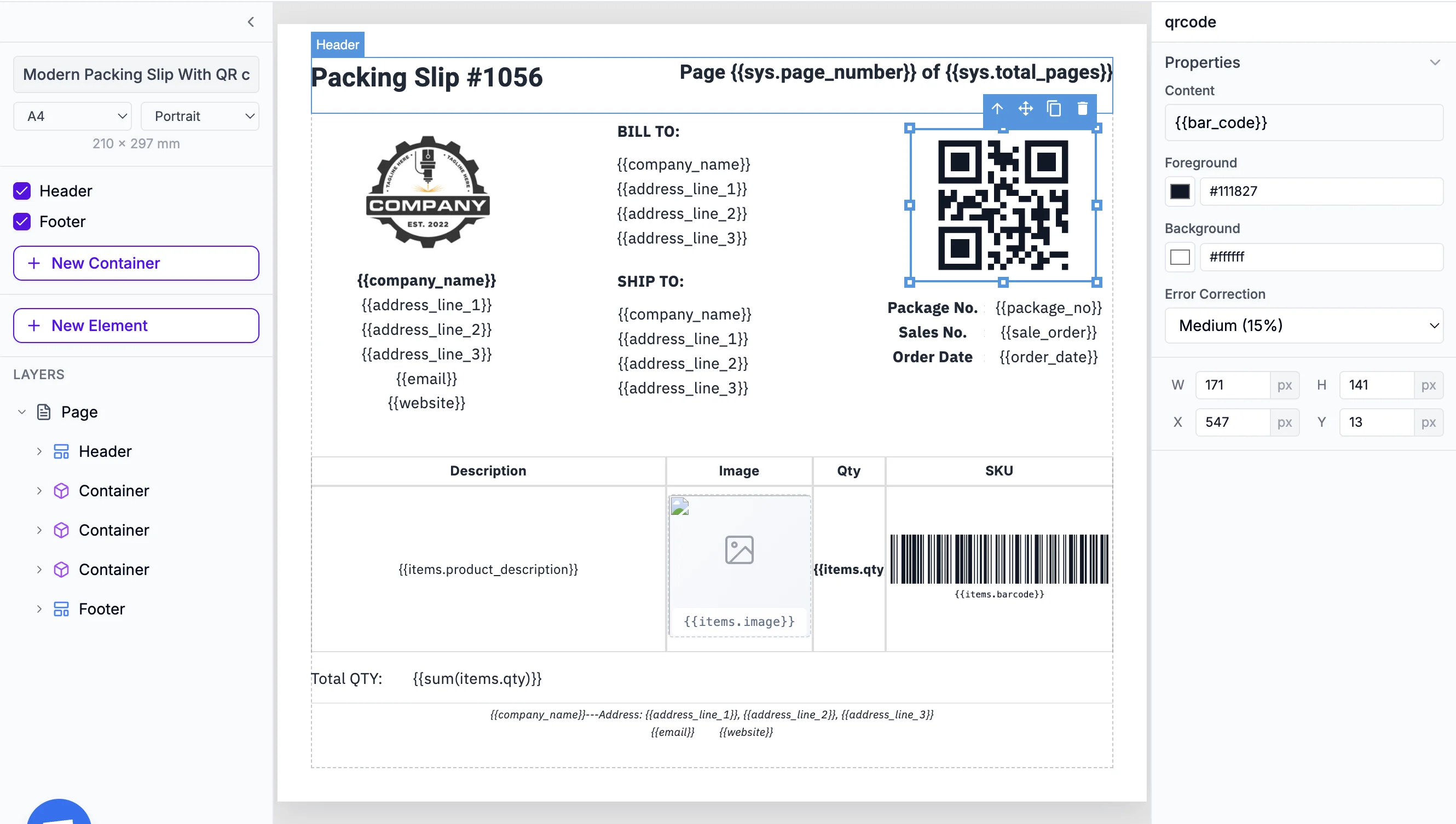
Access page numbers, total pages, and current date and more automatically with {{sys.page_number}} and friends.

2

Customize every component

Fine-tune content, borders, colors, sizes, positions, and more. Each element has its own properties panel.

3

Built-in functions

Format dates, calculate totals, round numbers, and more. Use 100+ built-in functions or create your own.

Start building

No credit card required

Template editor with expressions
1
2
3

Everything you need to design documents

Dynamic data binding
Auto-repeating table rows
Conditional sections (if/else)
Mathematical expressions
Aggregate functions (sum, avg)
QR codes & barcodes
Custom fonts (900+ Google Fonts)
Headers & footers
Page numbering
Dynamic images
Multi-page documents
Date & time formatting

Ready to generate at scale?

Once your template is designed, use our REST API to generate thousands of PDFs. SDKs for 7 languages, plus Zapier, Make, and n8n integrations.

Explore the PDF Generation API

Frequently asked questions

Do I need to know HTML/CSS to use the editor?

No. The editor is fully visual — drag and drop text, images, tables, and components. Power users can switch to HTML/CSS mode for full control at any time.

What's the difference between fixed and dynamic layouts?

Fixed layouts are pixel-perfect single-page designs where every element stays exactly where you place it — ideal for certificates, labels, and badges. Dynamic layouts let tables grow with your data and content flow across multiple pages — ideal for invoices, reports, and contracts.

Can tables automatically grow with my data?

Yes. Add a table with one row and mark it as repeating. When you send 3 items or 300, the table expands automatically. If it exceeds one page, it continues on the next page with headers repeating.

What components can I add to templates?

Text, images, tables, QR codes, barcodes (Code128, EAN-13, Code39, ITF14), shapes, lines, and hyperlinks. All components support dynamic data binding with {{variable}} syntax.

Can I use conditional logic in templates?

Yes. Show or hide sections based on your data with if/else conditions. For example, show a discount line only when a coupon code exists, or display different footers based on document type.

What about headers, footers, and page numbers?

Define headers and footers once — they repeat on every page automatically. Use system variables like {{sys.page_number}} and {{sys.total_pages}} for page numbering.

Can I use custom fonts?

Yes. Upload any TTF or WOFF font file and use it in your templates. We also include 900+ Google Fonts out of the box.

Can I do math in templates?

Yes. Use expressions like {{qty * price}} for calculations, and aggregate functions like sum(), avg(), min(), max(), and count() for totals.

How do I generate PDFs from my templates?

Once your template is ready, use our REST API to generate PDFs by sending JSON data. We also have SDKs for 7 languages and native integrations with Zapier, Make, and n8n.
Ready to use

Sample templates

Professional PDF templates for invoices, certificates, shipping labels, and more. Fully customizable and ready for API integration.

Professional Corporate Business Invoice

Professional Corporate Business Invoice

Clean Ecommerce Order Fulfillment Packing Slip

Clean Ecommerce Order Fulfillment Packing Slip

Printable Certificate of Achievement

Printable Certificate of Achievement

Itemized Sales Receipt Template

Itemized Sales Receipt Template

Shipping Label A4 with Tracking Barcode

Shipping Label A4 with Tracking Barcode

QR Code Sheet for Asset Tracking & URL Labels

QR Code Sheet for Asset Tracking & URL Labels

Automate your PDF generation

Complete documentation, no-code integrations, and a powerful API to help you generate PDFs at scale. Let us handle the boring stuff.
